What is JWT?

This post explains what JWT is, without getting into technical details you don’t need to know. Intention of the post is to dispel some harmful misconceptions.

In short, JWT is just a piece of data signed by someone. It doesn’t do much as-is but it’s a key building block useful in many applications.

What JWT Looks Like

eyJhbGciOiJIUzI1NiIsInR5cCI6IkpXVCJ9.eyJzdWIiOiIxMjM0NTY3ODkwIiwibmFtZSI6IkpvaG4gRG9lIiwiYWRtaW4iOnRydWV9.TJVA95OrM7E2cBab30RMHrHDcEfxjoYZgeFONFh7HgQ

If you look carefully, it’s basically three gibberish text separated by a period. Th role each part plays are:

Header.Payload.Signature

They look gibberish because they are encoded. Important part is the payload. Rest is there to describe (header) and protect (signature) the payload.

What Each Part Does

Header primarily describes (using JSON) how the Payload was signed so the Signature can be verified.

{
 "alg": "HS256",
 "typ": "JWT"
}

Payload is a collection of name-value pairs presented as JSON like this:

{
  "sub": "1234567890",
  "name": "John Doe",
  "admin": true
}

Signature protects both the Header and the Payload so that neither can be changed without detection.

Key Points About JWT

  • JWT doesn’t say anything meaningful about its sender, recipient nor signer as-is.
  • JWT is not encrypted as-is.

This is not to say JWT can’t but they have to be added. Allow me to go into a bit more detail on each points.

JWT doesn’t say anything meaningful about its sender, recipient nor signer as-is.

JWT typically includes some info on its signer so the signature can be verified but that only proves it was signed by someone who can prove they signed it. Unless the signer is known that is. How one know calls for relationship and/or infrastructure.

Same goes for sender and recipient. To verify sender or recipient, more has to be built-on top of JWT.

JWT is not encrypted as-is.

JWT is typically sent unencrypted over a secure channel of communication to a recipient but it may even be printed plainly using QR-code in newspapers. If you need to protect the token, encrypt it whole in  way that only the recipient can decrypt it. If only part of the payload needs to be protected, then encrypt just the value.


Follow up series of posts will discuss how to build with JWT to solve some common problems like protecting APIs or delegated authorization in a mobile app without issues OAuth has. Stay tuned.
Old Blog Posts Restored

As Monthly Archive links in the left-side bar shows, I uploaded old blog posts last night. Restoration wasn’t perfect of course.

  • Posts from between late 2005 to 2007 is missing. If they are not among backups, I’m going to extract them from Internet Archive.
  • Comments weren’t uploaded. Still on my todo list.
  • Permalinks weren’t restored so links coming in will 404 until they’re fixed.
  • Deadlinks, missing stories and downloads.
  • Category extractor had a separator bug, creating nutty categories like general;technical(fixed now).

Continue reading “Old Blog Posts Restored”

Processing Old Posts

Spent a couple of hours converting my old posts from XML with custom schema to JSON. Scrubbed some obvious spam comments (any comment with more than 5 hyperlinks).

Result is a 7MB JSON file containing 1756 blog posts with comments. Hash of IP addresses were not archived so they’ll all be treated as self-proclaimed foobars.

Next step is to POST them as well as assets they reference to WordPress.com via REST API which should take another couple of hours of hacking since I haven’t bothered to convert the posts to RSS.

Need A Good Theme

This blog goes way back, all the way to 2001. First 7 years of it was the most hectic but they’re archived and need to be restored.

Fresh start calls for a fresh theme. Something that’s simple yet easy to read. No gray text. I may just bang one out from scratch but would rather start with a good one like t his Rewritten Hemingway theme then tweak (post titles looks tad too big and too dark).

Update: That theme lasted only 5 min of staring at it. Let’s try Independent Publisher theme.

Blog Name Change

I’m preparing myself mentally to return to blogging, at a slower pace. To that end, I’ve renamed this blog to Weekly Habit. Blogging daily was exciting back then. I still want to but am wary of blogging for the sake of blogging.

Anyway, stay tuned.

On KISSmetrics

I think Hiten Shah, CEO of KISSmetrics, is too distracted with recent lawsuits to understand the mistake his company made: not looking out for their customers.

Legality of using ETag for tracking or reusing same ETag hash across domains is unclear and should be answered through legal process. What is clear, however, is that their usage raises suspicions and invites accusations against their loyal customers, not just KISSmetrics.

KISSmetrics should have foreseen this but apparently either did not or  did but failed to act before it blew up. I hope my two cents worth will help them learn and improve their service. Lawsuits may come and go but lessons learned will stay with you.

An ounce of foresight is worth a pound of hindsight.

Excuses make poor stain removers.

Cinemetrics

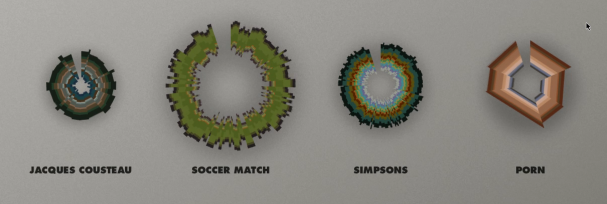
Cinemetrics is a promising example of Identicon IMO. Similar efforts have been made audio clips.

Cinemetrics aims to create a visual “fingerprint” for film using the editing structure, color, speech and motion.

Design challenge in generating interesting ‘fingerprint’ depends largely on the target audience. Multimedia production is a very iterative process resulting in many variations and combinations so, if the target audience are film editors, challenge is in finding ways to emphasize difference without sacrificing similarity.

Identicon and Robohash

This post is a dump [for archival purpose] of exchange between Colin Davis, creator of Robohash, and I that took place in context of a Hacker News about Robohash.

Colin:

Identicons are a great idea, I really love them.. They’re a good solution to a gut-check “Something is wrong here..”

Sort of like a SSH-fingerprint.

The problem I’ve had with them is that they’re generate not all that memorable. Was that triangles pointing left, then up, or up then left?

This is my attempt at addressing that problem for my own new project, but I’d love to see what you build! If you want to use these images, feel free. They’re CC-BY, so they’re open to the world now 😉

Don:

Re ‘not all that memorable’, that’s because identicons were originally designed for ‘distinguishing’ and ‘matching’ data, not ‘memorizing’.

Abstract geometric identicons like my original implementation as well as variations used at WordPress and StackOverflow are, while nearly impossible to remember, distinguishable in a pile which comes in handy when distinguishing the ‘voice’ of individuals in a long thread of comments.

To use identicons as permanent identity, one has to ‘identify’ with their identicon. We can identify faces of our friends because we shared memories with them, stories if you will.

So robotic identicons like yours can be made more memorable if users had some ways to create a story they can associate with it like ‘blue viking with left arm missing’, etc.

Colin:

That makes a lot of sense. I wasn’t trying to be disparing. It’s a great idea, and very helpful, I just felt like it could go in a slightly different direction for this specific use-case (Public Keys).

Don:

I think an interesting way to apply identicon to certs is to map each cert attributes to an ‘attribute’ of identicon, visualizing attributes.

What is Identicon?

Word identify has two meaning:

  1. Establish or indicate who or what (someone or something) is.
  2. Recognize or distinguish.

I chose the name Identicon with second meaning in mind to convey that Identicons’ intended applications are in helping users recognize or distinguish textual information units in context of many.

Textual Data Problem

Human eyes have evolved to recognize individual objects out of a group by noticing visual differences. Unfortunately, textual data are visually similar.

While many different typographic features and techniques have been invented since writing was invented, most of them are for free-form text. Additionally, list and table text layout lack the irregular features free-form text have, like line ends and paragraphs, to use as landmarks.

Icon Solution

Icons do add the necessary visual differences to textual data. Only problem is that icons are typically designed by hand or, in case of avatars, photos or pictures have to uploaded.

Identicon = Generated Icon?

One might say Identicons are simply generated icons. The first implementation of Identicon used salted hash of IP address to generate 9-block colored icon for each blog commenter. Most popular use of Identicon today remains generated iconic avatars.

I think it’s a bit more. Certainly, generated part is required. But the icon part is unnecessarily restrictive unless colored circle or box can be called an icon.

Identicon and QR Code

I was recently asked to provide some information on identicons, a good excuse to restart blogging.

This post, more like notes actually, compares Identicon to QR code which may seem similar visually but are not.

WARNING: I think in random fragments, brief moments of coherency, so my posts will be the same.

Machine vs People

Content

  • QR codes are containers of information.
  • Identicons are shadows of information they are associated with. 

Usage

  • QR codes are used to transfer information from real life (RL) objects to computers using only optical means.
  • Identicons are used to distinguish individuals or groups of information.
More to come later. Sorry.